HTML Tags
Below is a list of HTML tags.
The HTML tags are listed alphabetically to help you quickly find the tag you're looking for.
The HTML tags are listed alphabetically to help you quickly find the tag you're looking for.
| Tag | Name | Code Example | Browser View | ||||||||||||
| <a - | anchor | <a href="http://www.Yourdomain.com/" mce_href="http://www.Yourdomain.com/"> Visit Net-Toolz!</a> | Visit Net-Toolz! | ||||||||||||
| <b> | bold | <b>Example</b> | Example | ||||||||||||
| <big> | big (text) | <big>Example</big> | Example | ||||||||||||
| <body> | body of HTML document | <body>The content of your HTML</body> | Contents of your web page | ||||||||||||
| <br> | line break | The contents of your page<br>The contents of your page | The contents of your web page The contents of your web page | ||||||||||||
| <center> | center | <center>This will center your contents</center> | This will center your contents | ||||||||||||
| <dd> | definition description | <dl> <dt>Definition Term</dt><dd>Definition of the term</dd> <dt>Definition Term</dt><dd>Definition of the term</dd> </dl> |
| ||||||||||||
| <dl> | definition list | <dl> <dt>Definition Term</dt> <dd>Definition of the term</dd> <dt>Definition Term</dt> <dd>Definition of the term</dd></dl> |
| ||||||||||||
| <dt> | definition term | <dl><dt>Definition Term</dt> <dd>Definition of the term</dd><dt>Definition Term</dt> <dd>Definition of the term</dd> </dl> |
| ||||||||||||
| <em> | emphasis | This is an <em>Example</em> of using the emphasis tag | This is an Example of using the emphasis tag | ||||||||||||
| <embed> | embed object | <embed src="yourfile.mid" mce_src="yourfile.mid" width="100%" height="60" align="center"> | |||||||||||||
| <font> | font | <font face="Times New Roman">Example</font> | Example | ||||||||||||
| <font> | font | <font face="Times New Roman" size="4">Example</font> | Example | ||||||||||||
| <font> | font | <font face="Times New Roman" size="+3" color="#ff0000">Example</font> | Example | ||||||||||||
| <form> | form | <form action="mailto:you@yourdomain.com"> Name: <input name="Name" value="" size="10"><br> Email: <input name="Email" value="" size="10"><br> <center><input type="submit"></center></form> | |||||||||||||
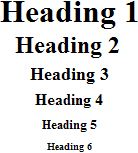
| <h1> <h2> <h3> <h4> <h5> <h6> | heading 1heading 2heading 3heading 4heading 5heading 6 | <h1>Heading 1 Example</h1><h2>Heading 2 Example</h2><h3>Heading 3 Example</h3><h4>Heading 4 Example</h4><h5>Heading 5 Example</h5><h6>Heading 6 Example</h6> | |||||||||||||
| <head> | heading of HTML document | <head>Contains elements describing the document</head> | Nothing will show | ||||||||||||
| <hr> | horizontal rule | <hr /> | Contents of your web page Contents of your web page | ||||||||||||
| <hr> | horizontal rule | <hr width="50%" size="3" /> | Contents of your web page Contents of your web page | ||||||||||||
| <hr> | horizontal rule | <hr width="50%" size="3" noshade /> | Contents of your web page Contents of your web page | ||||||||||||
| <hr> (Internet Explorer) | horizontal rule | <hr width="75%" color="#ff0000" size="4" /> | Contents of your web page Contents of your web page | ||||||||||||
| <hr> (Internet Explorer) | horizontal rule | <hr width="25%" color="#6699ff" size="6" /> | Contents of your web page Contents of your web page | ||||||||||||
| <html> | hypertext markup language | <html> <head> <meta> <title>Title of your web page</title> </head> <body>HTML web page contents </body></html> | Contents of your web page | ||||||||||||
| <i> | italic | <i>Example</i> | Example | ||||||||||||
| <img> | image | <img src="example.gif" mce_src="example.gif" width="41" height="41" border="0" alt="text describing the image" /> |  | ||||||||||||
| <input> (Internet Explorer) | input field | Example 1: <form method=post action="/cgi-bin/example.cgi"> <input type="text" style="color: #ffffff; font-family: Verdana; font-weight: bold; font-size: 12px; background-color: #72a4d2;" size="10" maxlength="30"><input type="Submit" value="Submit"> </form> | |||||||||||||
| <input> | input field | Example 2: <form method=post action="/cgi-bin/example.cgi"> Enter Your Comments:<br> <textarea wrap="virtual" name="Comments" rows=3 cols=20 maxlength=100></textarea><br><input type="Submit" value="Submit"><input type="Reset" value="Clear"> </form> | |||||||||||||
| <input> | input field | Example 3: <form method=post action="/cgi-bin/example.cgi"> <center> Select an option: <select> <option >option 1</option> <option selected>option 2</option> <option>option 3</option> <option>option 4</option> <option>option 5</option> <option>option 6</option> </select><br><input type="Submit" value="Submit"></center> </form> | |||||||||||||
| <input> | input field | Example 4: <form method=post action="/cgi-bin/example.cgi"> Select an option:<br><input type="radio" name="option"> Option 1<input type="radio" name="option" checked> Option 2<input type="radio" name="option"> Option 3 <br> <br> Select an option:<br><input type="checkbox" name="selection"> Selection 1<input type="checkbox" name="selection" checked> Selection 2<input type="checkbox" name="selection">Selection 3<input type="Submit" value="Submit"> </form> | |||||||||||||
| <li> | list item | Example 1: <menu> <li type="disc">List item 1</li><li type="circle">List item 2</li><li type="square">List item 3</li> </MENU> | Example 1:
| ||||||||||||
| <link> | link | <head> <link rel="stylesheet" type="text/css" href="style.css" mce_href="style.css" /> </head> | |||||||||||||
| <marquee> (Internet Explorer) | scrolling text | <marquee bgcolor="#cccccc" loop="-1" scrollamount="2" width="100%">Example Marquee</marquee> | |||||||||||||
| <menu> | menu | <menu> <li type="disc">List item 1</li> <li type="circle">List item 2</li> <li type="square">List item 3</li></menu> |
| ||||||||||||
| <meta> | meta | <meta name="Description" content="Description of your site"><meta name="keywords" content="keywords describing your site"> | Nothing will show | ||||||||||||
| <meta> | meta | <meta HTTP-EQUIV="Refresh" CONTENT="4;URL=http://www.yourdomain.com/"> | Nothing will show | ||||||||||||
| Scrolling Text from Quackit.com | |||||||||||||||
| <option> | listbox option | <form method=post action="/cgi-bin/example.cgi"> <center> Select an option: <select><option>option 1</option><option selected>option 2</option><option>option 3</option><option>option 4</option><option>option 5</option><option>option 6</option> </select><br> </center> </form> | |||||||||||||
| <p> | paragraph | This is an example displaying the use of the paragraph tag. <p> This will create a line break and a space between lines. Attributes: Example 1:<br> <br><p align="left"> This is an example<br> displaying the use<br> of the paragraph tag.<br> <br> Example 2:<br> <br><p align="right"> This is an example<br> displaying the use<br> of the paragraph tag.<br> <br> Example 3:<br> <br><p align="center"> This is an example<br> displaying the use<br> of the paragraph tag. | This is an example displaying the use of the paragraph tag. This will create a line break and a space between lines.Attributes: Example 1: This is an example displaying the use of the paragraph tag. Example 2: This is an example displaying the use of the paragraph tag. Example 3: This is an example displaying the use of the paragraph tag. | ||||||||||||
| <small> | small (text) | <small>Example</small> | Example | ||||||||||||
| <strike> | deleted text | <strike>Example</strike> | |||||||||||||
| <strong> | strong emphasis | <strong>Example</strong> | Example | ||||||||||||
| <table> | table | Example 1: <table border="4" cellpadding="2" cellspacing="2" width="100%"> <tr> <td>Column 1</td> <td>Column 2</td> </tr></table> Example 2: (Internet Explorer) <table border="2" bordercolor="#336699" cellpadding="2" cellspacing="2" width="100%"> <tr> <td>Column 1</td> <td>Column 2</td> </tr></table> Example 3: <table cellpadding="2" cellspacing="2" width="100%"> <tr> <td bgcolor="#cccccc">Column 1</td> <td bgcolor="#cccccc">Column 2</td> </tr> <tr> <td>Row 2</td> <td>Row 2</td> </tr></table> | Example 1:
Example 2:
Example 3:
| ||||||||||||
| <td> | table data | <table border="2" cellpadding="2" cellspacing="2" width="100%"> <tr><td>Column 1</td> <td>Column 2</td> </tr> </table> |
| ||||||||||||
| <th> | table header | <div align="center"> <table> <tr><th>Column 1</th> <th>Column 2</th> <th>Column 3</th> </tr> <tr> <td>Row 2</td> <td>Row 2</td> <td>Row 2</td> </tr> <tr> <td>Row 3</td> <td>Row 3</td> <td>Row 3</td> </tr> <tr> <td>Row 4</td> <td>Row 4</td> <td>Row 4</td> </tr> </table> </div> |
| ||||||||||||
| <title> | document title | <title>Title of your HTML page</title> | Title of your web page will be viewable in the title bar. | ||||||||||||
| <tr> | table row | <table border="2" cellpadding="2" cellspacing="2" width="100%"><tr> <td>Column 1</td> <td>Column 2</td></tr> </table> |
| ||||||||||||
| <tt> | teletype | <tt>Example</tt> | Example | ||||||||||||
| <u> | underline | <u>Example</u> | Example | ||||||||||||
| <ul> | unordered list | Example 1:<br> <br><ul> <li>List item 1</li> <li>List item 2</li></ul> <br> Example 2:<br><ul type="disc"> <li>List item 1</li> <li>List item 2</li><ul type="circle"> <li>List item 3</li> <li>List item 4</li></ul> </ul> | Example 1:
Example 2:
|